
Shopify and WordPress together: four setups compared
Shopify plus WordPress means two opposite setups: WordPress as the main site selling through Shopify, or a Shopify store with WordPress for content. Decide which one you need, then the URLs, duplicates and migration follow.
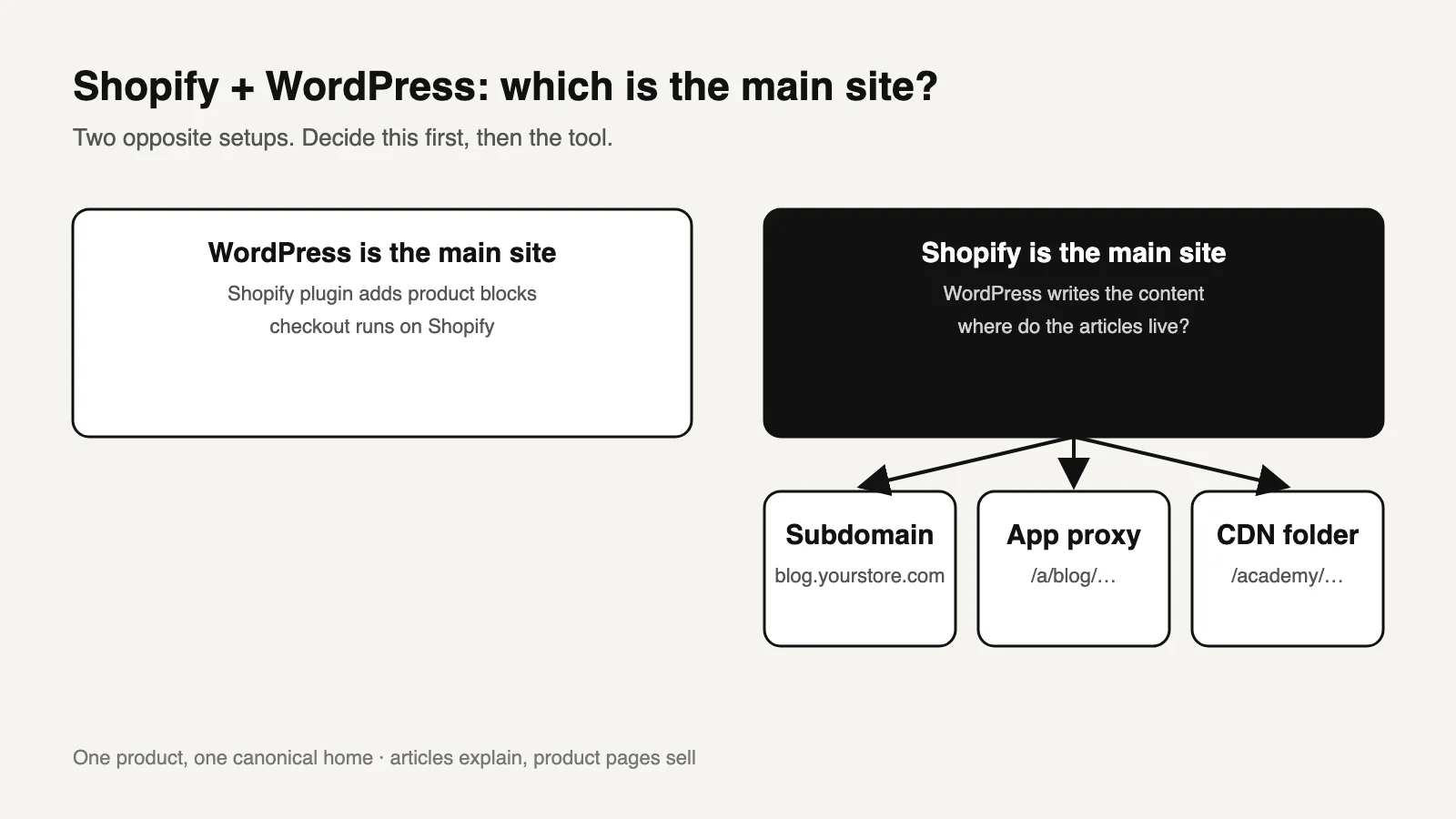
01First decide which site is the main one
"Shopify and WordPress together" describes two opposite setups. Pick one before you pick a tool.
| WordPress is the main site | Shopify is the main site | |
|---|---|---|
| Typical owner | Publisher, creator or brand whose audience already reads the WordPress site | Store whose revenue comes from the Shopify storefront |
| Commerce runs through | Shopify's WordPress plugin: product blocks in posts and pages, payment in Shopify's checkout [1] | The Shopify theme, unchanged |
| WordPress is used for | Everything except checkout | Blog, guides or reference content |
| Main SEO question | Which URL is each product's home: Shopify or WordPress? | Where do the articles live: subdomain, proxy or folder? |
There is a third answer: move the articles into Shopify's own blog and retire WordPress. Read what the built-in blog can and cannot do before choosing it.
02Four setups and what each one costs you
| Setup | Where pages live | Good for | Watch out for |
|---|---|---|---|
| Shopify plugin for WordPress | Your WordPress domain, with checkout on Shopify | Content-led sites adding commerce | Product blocks on WordPress and product pages on Shopify can compete for the same searches |
| WordPress on a subdomain | blog.yourstore.com | Fast setup, no proxy | Separate navigation, templates and Search Console property |
| App proxy into the store | yourstore.com/a/blog/… | One domain without edge configuration | Fixed /a/, /apps/, /community/ or /tools/ prefix. Cookies are stripped, so WordPress logins and comments do not pass through [2] |
| CDN routing into a folder | yourstore.com/academy/… | Teams that can own edge rules | A loose rule can capture Shopify paths. Certificate renewal must keep working |
Which one to pick
- Most traffic comes from articles and you are adding commerce: plugin, with WordPress as the main site.
- The store is the business and the blog is small: Shopify's blog, or WordPress on a subdomain if moving is not worth it.
- The store is the business and the content library is large or multilingual: a folder on the store domain. Someone must own the routing. The details, including why
/academy/is safer than/blog/, are in Shopify blog in a subfolder.
03Give each product one home
In a combined setup, the usual SEO problem is duplication, not the platform. The same product can end up described in three places:
- on Shopify;
- in a WordPress post through a product block;
- in a buying guide that copies the description.
Google then has to choose between three similar pages.
Choose the canonical home
Usually this is the Shopify product page. It carries the live price, variants and availability. The exception is a content-led site using the plugin, where the WordPress product article may deliberately be the main page.
Let articles explain, not repeat
Articles answer the question around the product, such as how to choose it or how to use it, and then link to the product page. They do not reproduce its description.
Put product markup in one place
Product structured data belongs on the page that sells the product. Embedding a product block does not make an article a product page.
Quick check: search Google for site:yourdomain.com "exact product name" and site:blog.yourdomain.com "exact product name". If both return a page that mainly describes the product, decide which one should keep that role.
04Moving WordPress posts into Shopify
| WordPress URL type | Shopify equivalent | What to do |
|---|---|---|
/post-name/ or /2024/05/post-name/ | /blogs/news/post-name | Redirect each one, one to one |
Category archive /category/x/ | A separate blog, or a tag page | Redirect useful categories to the closest blog or collection |
| Tag, author and date archives | Usually none | Redirect the few with traffic. Let the rest return 404 or 410 |
Media /wp-content/uploads/… | Shopify Files CDN | Re-upload images and update links in the imported posts |
Pages /about/, /contact/ | /pages/about | Recreate as Shopify pages and redirect |
Two Shopify rules shape the migration [3]:
- URL redirects only fire for paths that no longer resolve. If the old WordPress site stays online on the same hostname, its pages keep answering instead of redirecting.
- Redirects must be paths on the store. Create them after the DNS has moved to Shopify.
Worked example: a WordPress blog with 120 posts, 15 categories and 300 tag pages. The 120 posts get one redirect each. Perhaps 6 categories have meaningful traffic in Search Console and get redirects. The 300 tag pages are usually left to 404 unless one of them earns links. That is 126 redirects, not 435.
05Copy this redirect mapping sheet and fill in the brackets
WordPress to Shopify redirect map
old_url,new_url,type,last_28d_clicks,decision,checked_on
/[post-name]/,/blogs/[news]/[post-name],post,[n],redirect,[date]
/category/[name]/,/blogs/[guides] or /collections/[name],category,[n],redirect|drop,[date]
/tag/[name]/,—,tag,[n],drop (404) unless clicks > [threshold],[date]
/wp-content/uploads/[file],/cdn/shop/files/[file],media,—,re-upload + update links,[date]
Owner: [name]  ·  Import date: [date]  ·  Recheck in Search Console: [date + 2 weeks]
06Questions
Can you use WordPress and Shopify together?
Yes. Shopify publishes a free plugin that adds Shopify products to WordPress, with payment through Shopify's checkout [1]. Stores can also run WordPress for content next to a Shopify storefront. They are different setups with different SEO implications.
Is WordPress better than Shopify for SEO?
Neither platform ranks pages by itself. WordPress gives more control over URLs, templates and plugins. Shopify gives a managed store with fewer moving parts. The content and its structure matter more than the platform.
Will WordPress on a subdomain hurt my store?
Not directly. Google has said it handles subdomains and subdirectories [4]. The cost is separate navigation, analytics and internal links, which you have to maintain on purpose.
Do I need to keep WordPress after importing posts?
Not on the same hostname. While it still answers there, Shopify redirects will not take effect. Keep a private backup and the redirect map.
Sources and what still needs a direct check
- Shopify, Shopify plugin for WordPress. Product blocks, Shopify checkout, free plugin with any Shopify plan. Checked October 14, 2026. We have not tested the plugin on a production store.
- Shopify, About app proxies and dynamic data. Prefixes and stripped headers. Checked October 14, 2026.
- Shopify Help Center, URL redirects. Checked October 14, 2026.
- Google Search Central public statements on subdomains and subdirectories, as reported in industry coverage.
Still to check yourself
- The plugin's current feature list and any plan restrictions in your Shopify admin.
- Which WordPress URLs actually have clicks or links. Use Search Console and your backlink data, not the full URL list.
- Whether your WordPress SEO plugin added canonical or noindex rules that must be recreated in Shopify.
Next: write one sentence, "The main site is ___, and the other system exists to ___." To have the routing designed so WordPress and Shopify share one domain cleanly, see our architecture page or request an assessment.