
Shopify blog in a subfolder: what actually works
Shopify keeps its own blog under /blogs/. To serve WordPress or another CMS in a folder on your store domain, something in front of Shopify has to route that one folder elsewhere. Here is what each option gives you, where it breaks, and the rules ShopXN.net runs in production.
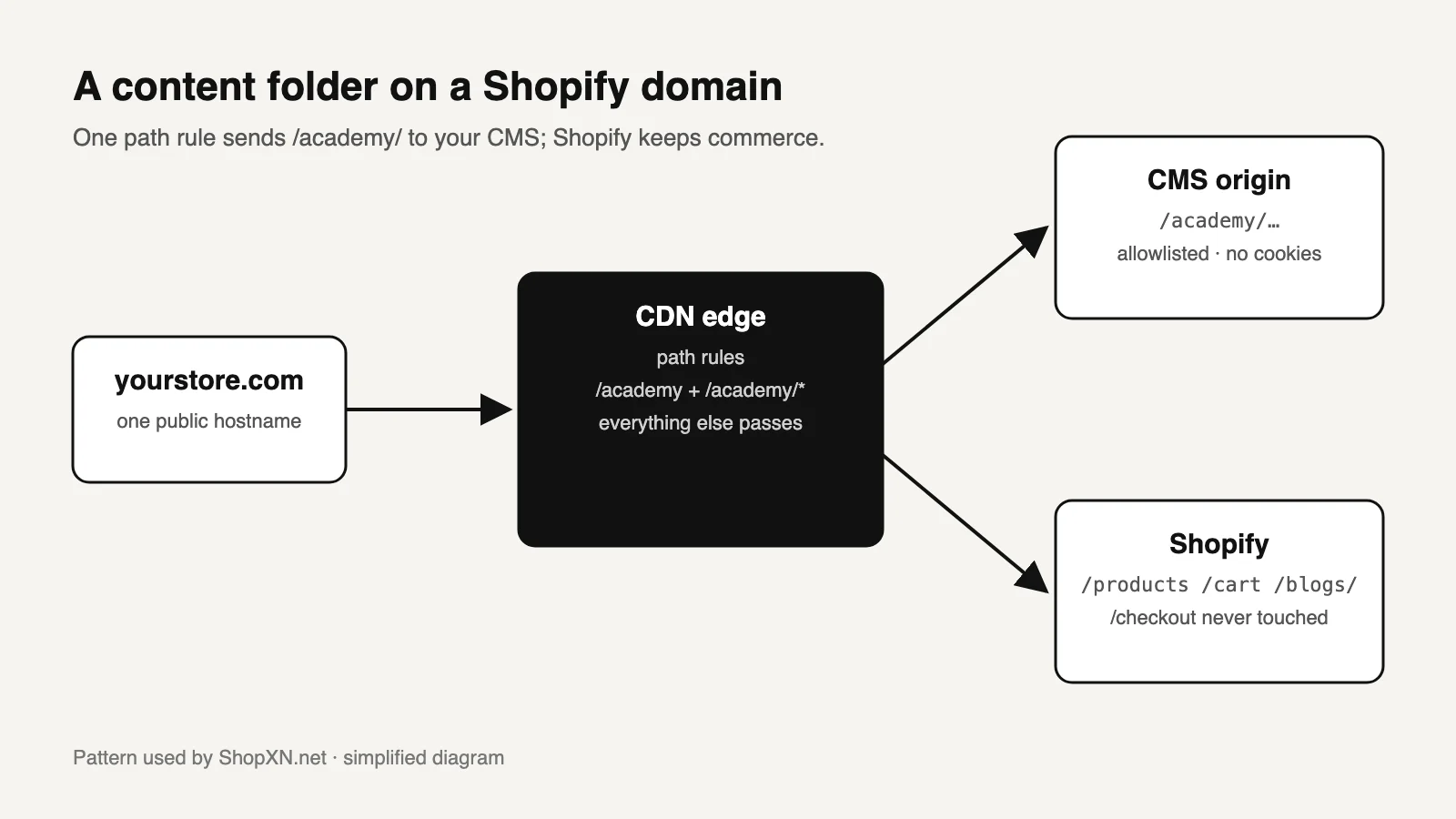
01What Shopify allows, and what it does not
Shopify's own blog always lives under /blogs/, for example /blogs/news/your-article. You can change the blog handle and the article handle, but not the /blogs/ segment [6]. Shopify cannot host pages from WordPress or another CMS itself. To show them in a folder on your store domain, something in front of the storefront has to route that one folder to another origin and leave every other path to Shopify.
| Fact | What it establishes | What it does not establish |
|---|---|---|
App proxy paths must start with /a/, /apps/, /community/ or /tools/ [1] | An official, plan-independent way to serve external pages on the store domain | A bare top-level folder such as /academy/ |
| At least one major CDN documents a supported proxy mode for Shopify custom domains [2] | A real top-level folder is technically possible on any Shopify plan | That Shopify supports your routing code, or that it cannot break |
| Google says it handles subdomains and subdirectories [5] | A subdomain is not penalised | That a folder ranks better. Benefits come from shared navigation and internal links |
Shopify's sitemap.xml is generated by the platform and cannot be edited [4] | External content needs its own sitemap | That Google will find that sitemap without a robots.txt entry or a Search Console submission |
If all you want is a short link to share, a URL redirect from /blog to /blogs/news is enough. It changes the entry link, not the article URLs. Before you move content out of Shopify at all, check what the built-in blog can and cannot do. Many stores need better templates, not a second system.
02Choose by the URL you need and the risk you can own
| Option | Public URL | What you take on | Typical failure |
|---|---|---|---|
Redirect /blog → /blogs/news | Articles stay at /blogs/news/… | Nothing new | Only the entry link changes |
| Native Shopify blog | /blogs/<blog>/<article> | Theme templates | One template per blog, thin content model |
| App proxy, for example a WordPress proxy app | /a/academy/… | The app, its origin and uptime | Staff change the prefix and hard-coded links break. Cookies are stripped [1] |
| CDN path routing in a documented Shopify mode | /academy/… | DNS, routing rules, origin, cache | A rule that captures Shopify paths, or blocked certificate renewal |
| Self-managed reverse proxy in front of Shopify | /academy/… | The whole edge configuration | Undocumented by Shopify. Merchants report verification and SSL problems [7] |
| Subdomain | blog.yourstore.com | A DNS record and a separate site | Separate navigation, analytics view and Search Console property |
What an app proxy means in practice
Shopify's documentation sets these limits [1]:
- The subpath is at most 30 characters.
- Each app has one proxy route.
- Store staff can change the prefix and subpath after installation.
CookieandSet-Cookieare stripped.
The consequences for a content folder:
- WordPress logins, comments and previews do not work through the proxy.
- Every canonical tag and sitemap entry must use the public proxied URL, never the origin address.
What CDN routing means in practice
In the documented Shopify mode, the shop's custom domain is proxied by your CDN zone and then passed to Shopify [2]. A path rule for the content folder sends those requests to your CMS; every other request continues to Shopify. You become responsible for those rules. If nobody on the team can read and maintain them, an app proxy or a subdomain is the more honest choice.
If the second system is WordPress, Shopify and WordPress together also covers the plugin route and migration. If you are considering rebuilding the storefront too, compare headless Shopify with a separate content system first.
03Name the folder so it cannot collide with Shopify
This is where most do-it-yourself attempts fail first. Edge path rules commonly use a trailing wildcard that matches any suffix [3].
The collision
A rule written as yourstore.com/blog* matches all of these:
/blogand/blog/…, which is what you intended;/blogs/news/…, Shopify's own blog;/blog-sale, which could be a product or page handle.
Your CMS then answers for URLs it does not own, and those pages either break or are duplicated.
The fix
- Pick a name that is not a prefix of a Shopify path. Avoid anything that begins like
/blogs,/products,/collections,/pages,/cart,/account,/search,/checkout,/appsor/a./academy/,/guides/or/learn/are safer than/blog/. - Write two exact rules:
/academyand/academy/*. Never use/academy*. - Decide on lowercase. Route patterns are case-sensitive [3], so
/Academy/will not reach your CMS. Redirect case variants to the lowercase URL.
If you must use the word "blog", keep it a separate segment (/blog plus /blog/*) and re-test /blogs/news after every routing change.
Three settings that must stay untouched
- Checkout. In the documented mode we use, edge scripts do not run on
/checkout[2]. Design the content system so it never needs to. - Certificate renewal. Shopify renews your certificate through
/.well-known/acme-challenge/. A blanket "force HTTPS" setting at the edge can block it [2]. Exclude that path from any HTTPS redirect. - Domain verification. Confirm the domain still shows as connected in Shopify after the change.
04How ShopXN.net runs this in production
ShopXN.net is a Shopify store selling travel eSIMs. Its travel reference library, in English and Chinese, lives in a folder on the same domain and is served from a separate content origin through CDN routing.
We checked the response headers on October 14, 2026:
- Storefront paths such as
/products/returnpowered-by: Shopify. - Library pages return no Shopify headers and their own
X-Robots-Tag: index, follow.
The routing rules, written as behavior
| Request | Edge response | Why |
|---|---|---|
GET /academy/first-guide/ (published) | Fetch from the content origin, remove Set-Cookie, return 200 with index, follow | Only published pages reach the origin. Shopify cookies are never involved |
GET /academy/old-draft/ (not published) | 404 with noindex, without asking the origin | A typo or old origin URL cannot become an indexable duplicate |
POST /academy/… | 405, only GET and HEAD allowed | The content folder is read-only |
| Origin returns 500 | Pass the status through with noindex | Error pages never get indexed |
| Origin hostname requested directly | X-Robots-Tag: noindex, nofollow | Only the public URLs compete in search |
/products/…, /cart, /blogs/…, /checkout | Never matched, served by Shopify | Commerce stays on Shopify |
Two more decisions complete the setup:
- Tags point to the public folder. Each page declares its own public URL as canonical, and the English and Chinese versions reference each other with hreflang.
- The library has its own sitemap. The store's
robots.txtlists it as a secondSitemap:line, added throughrobots.txt.liquid[4].
What the folder did not do
On October 9, 2026 we inspected 99 of the library's URLs in Search Console:
| Status | URLs | Share |
|---|---|---|
| Indexed | 5 | 5% |
| Discovered – currently not indexed | 42 | 42% |
| URL is unknown to Google | 52 | 53% |
Sharing the store's hostname gave us control over routing and navigation. It did not make Google crawl new pages faster. New pages still have to earn crawling through internal links and usefulness. Plan links from pages that are already indexed into the new folder, and read the folder's progress one page at a time in Search Console.
05Launch checks and the result you should see
| Check | How | Expected result |
|---|---|---|
| The folder is yours | curl -I https://yourstore.com/academy/ | 200, no powered-by: Shopify. The HTML canonical points to the same URL |
| Shopify paths are untouched | Request /blogs/news, a product and /cart | Shopify headers on all three. If /blogs/ reaches your CMS, a rule is too broad |
| Checkout works | Add a product to the cart in a test session and open checkout | Checkout page loads. Stop before paying unless a test order is approved |
| Unknown paths are real 404s | /academy/does-not-exist/ | 404 status, not a 200 page that says "not found" |
| The origin cannot be indexed | Request the origin hostname directly | Redirect to the public URL, or noindex |
| Google can find the sitemap | Open /robots.txt and the folder sitemap | A Sitemap: line for the folder, and every listed URL uses the public folder |
| Google agrees on the canonical | URL Inspection on one crawled article | User-declared canonical = Google-selected canonical |
| Certificate renewal works | Review edge HTTPS settings | /.well-known/acme-challenge/ is neither redirected nor blocked |
06Move existing /blogs/ articles without losing them
Shopify's URL redirects are meant for addresses that no longer resolve [6]. A redirect from a native article that is still published will not fire.
- Publish in the new folder. Confirm the new URL returns 200 and declares itself canonical.
- Unpublish the Shopify article. Its old URL now returns 404.
- Add the redirect. Redirect the old
/blogs/…URL to the new address. - Update links you control. Fix theme links, navigation and product descriptions, so you do not rely on the redirect forever.
- Move a small batch first. Confirm the redirects in Search Console before moving the rest.
Worked example: moving 60 articles in batches of 10 means six rounds. If each round is checked after a week of crawling, the move takes about six weeks rather than one afternoon. In return, a template or redirect mistake affects 10 URLs instead of 60.
07Plan the rollback before launch
If you delete the routing rule, the folder falls back to Shopify, which has no such pages, and every article becomes a 404. Decide in advance:
- Short outage: keep a minimal rule that returns
503withRetry-Afterfor the folder. - Abandoning the setup: move the articles back into the native blog and redirect each folder URL to its new address.
A 503 for a few hours is recoverable. Weeks of 404s are not.
08Copy this routing brief and fill in the brackets
Routing brief for a content folder on a Shopify domain
Public folder: https://[yourstore.com]/[academy]/
Exact rules: /[academy] and /[academy]/* (no trailing-wildcard rule like /[academy]*)
Content origin: [origin hostname], must answer noindex, nofollow when requested directly
Allowed methods: GET, HEAD. Everything else: 405
Unpublished paths: 404 + noindex, without contacting the origin
Origin errors: pass status through + noindex
Cookies: remove Set-Cookie from content responses
Never match: /products, /collections, /cart, /checkout, /account, /blogs, /pages, /search
HTTPS: do not redirect or block /.well-known/acme-challenge/
Sitemap: /[academy]/sitemap.xml, listed in robots.txt.liquid as a second Sitemap: line
Canonical and hreflang: public folder URLs only
Rollback: 503 + Retry-After rule ready, owner: [name]
Acceptance: the eight launch checks, with results recorded on [date]
09Questions
Does Shopify allow a proxy in front of the store?
Some CDN providers document a Shopify-specific mode for custom domains [2]. For self-managed reverse proxies we found no Shopify documentation as of October 14, 2026, and community threads asking this have no official answer [7]. Ask Shopify Support before you rely on one.
Does Shopify Plus have a built-in reverse proxy for /blog?
Some community replies say so. We could not find it in Shopify's official documentation, so treat it as unconfirmed and ask your Shopify contact.
Will a folder rank better than a subdomain?
Google has said it handles both [5]. A folder makes it easier to share navigation and internal links with the store. Those links help; the folder name does not.
Can I remove /blogs/ from Shopify's native blog URLs?
No. You can rename the blog and article handles, but the /blogs/ segment is fixed. That is why the options above exist.
Who should own the routing after launch?
One named person or team who can read the rules, has access to the CDN account and is told about every theme or domain change. Without an owner, the folder becomes the most fragile part of the store.
Sources and what still needs a direct check
- Shopify, About app proxies and dynamic data. Prefixes, subpath limits, stripped headers. Checked October 14, 2026.
- A CDN provider's published Shopify custom-domain setup guide and its June 3, 2025 change note. Proxy mode, the HTTPS setting warning and blocked edge scripts on
/checkout. Checked October 14, 2026. - The same provider's route pattern reference. Trailing wildcards and case sensitivity. Checked October 14, 2026.
- Shopify, Customize robots.txt. Extra sitemap URLs. ShopXN.net's live
robots.txtand Shopify-generatedsitemap.xml, observed October 14, 2026. - Google Search Central public statements that subdomains and subdirectories are both handled, as reported in industry coverage. No dedicated Search Central page compares the two.
- Shopify Help Center, URL redirects, and Shopify Community replies on the fixed
/blogs/segment. - Shopify Community threads on reverse proxies for
/blog(2024–2025). Merchant reports, not policy.
Still to check yourself
- Your CDN provider's current Shopify instructions. Settings and restrictions change.
- Whether any app, theme feature or marketing tool already uses the folder name you picked.
- Whether your Shopify plan or contract has terms about proxies in front of the store.
The ShopXN.net observations come from our own production headers and Search Console checks. The routing table is a simplified description, not a drop-in configuration. If you want the routing designed and implemented for you, see our content hub service and architecture page, or request an assessment. For a broader baseline, use the technical SEO audit checklist. If the content needs several languages, read the international SEO guide before naming folders.